What's Best Next

  • Newsletter
  • Our Mission
  • Contact
  • Resources
    • Productivity
    • Leadership
    • Management
    • Web Strategy
    • Book Extras
  • Consulting & Training
  • Store
    • Online Store
    • Cart
    • My Account
  • About
    • Our Mission
    • Our Core Values
    • Our Approach to Productivity
    • Our Team
    • Contact
You are here: Home / Blog

Why Some People Spend So Much Time Fiddling With Their GTD Categories

September 3, 2009 by Matt Perman

Many productivity bloggers, including Merlin Mann at the very helpful 43 Folders, have noted that many people seem to waste a lot of time fiddling with their GTD categories.

Sometimes the words against this can get pretty harsh. And I grant, it can be a waste of time.

But what we really need to do is step back and ask: why does this happen? Why do so many people feel a need to rework their GTD categories?

I think this is a symptom that the GTD process is not completely ironed out. There are snags in it. People intuitively feel this, and hence are motivated to get them ironed out. But they can’t really figure out how to get this kink out, so they are stuck endlessly changing their categories — and even software — in the quest for the solution.

If the GTD context categories were fully in sync with the way our minds want to work, people wouldn’t be wasting time fiddling with their contexts or changing software. The fact that they are shows that more progress needs to be made.
Filed Under: GTD

Is the Role of the Manager Still Important?

September 3, 2009 by Matt Perman

The following is very good insight into the role of a manager and why it is important, from Marcus Buckingham’s First, Break All the Rules: What the World’s Greatest Managers Do Differently (pp 58-59).

Conventional wisdom of late has tended to diminish the value of the manager:

Conventional wisdom tells us that the manager role is no longer very important. Apparently managers are now an impediment to speed, flexibility, and agility. Today’s agile companies can no longer afford to employ armies of managers to shuffle papers, sign approvals, and monitor performance. They need self-reliant, self-motivated, self-directed work teams. No wonder managers were first against the wall when the reengineering revolution came.

Besides, continues conventional wisdom, every “manager” should be a “leader.” He must seize opportunity, using his smarts and impatience to exert his will over a fickle world. In this world, the staid little manager is a misfit. It is too quick for him, too exciting, too dangerous. He had better stay out of the way. He might get hurt.

But conventional wisdom has led us astray:

Conventional wisdom has led us all astray. Yes, today’s business pressures are more intense, the changes neck-snappingly fast. Yes, companies need self-reliant employees and aggressive leaders. But all this does not diminish the importance of managers. On the contrary, in turbulent times the manager is more important than ever.

This becomes clear when you understand what a manager really is:

Why? Because managers play a vital and distinct role, a role that charismatic leaders and self-directed teams are incapable of playing. The manager role is to reach inside each employee and release his unique talents into performance. This role is best played one employee at a time: one manager asking questions of, listening to, and working with one employee. Multiplied a thousandfold, this one-by-one-by-one role is the company’s power supply. In times of great change it is this role that makes the company robust — robust enough to stay focused when needed, yet robust enough to flex without breaking.

In other words, the manager plays a critical catalyst role:

In this sense, the manager role is the “catalyst” role. As with all catalysts, the manager’s function is to speed up the reaction between two substances, thus creating the desired end product. Specifically the manager creates performance in each employee by speeding up the reaction between the employee’s talents and the company’s goals, and between the employee’s talents and the customers’ needs. When hundreds of managers play this role well, the company becomes strong, one employee at a time.

Filed Under: 4 - Management

Recommended Scissors, Letter Openers, and Post-Its

September 3, 2009 by Matt Perman

Post 8 in the series: Recommended Productivity Tools

Scissors

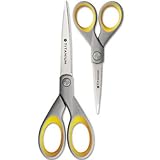
When it comes to scissors, the key need is that they cut well. Also, they should look decent — ugly tools create drag.

There are lots of options to chose from, but I use these Westcott Titanium Scissors, and they work great:

Letter Openers

The first thing to say about letter openers is that you should have one. I never even knew they existed until about 2 years into our marriage, when we went to Africa and bought one as a souvenir. I still use that same one, and it works great.

Anyway, before I knew they existed opening the mail was more work than it had to be. So if you don’t have one, I recommend getting one — even if you don’t get much physical mail any more. Even if you just have to use it once in a while, it is still worth it.

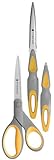
It looks like there’s one that corresponds to the above scissors; in fact, you can get it in a package set with the scissors:

However, that package actually illustrates the type of scissors that I would not get — the scissors you see there is a bigger, bulkier scissors with a weird handle. That’s fine in the kitchen. But for the office, I recommend the smaller scissors — the kind shown earlier. But for the letter opener, the kind shown in that package is fine. Here’s the Amazon link to see it by itself.

Post-Its

When it comes to post-its, there are three things to remember.

First, don’t use them to keep track of action items. Post-its are a poorly organized system for managing what you have to do, let alone prioritizing it. It’s hard to even remember to look at the post-its with various tasks written on them, scattered all over.

So avoid this practice. Manage to-do items in a task management system. Capture them in a journal, such as the moleskine journal I blogged on earlier, or on a paper pad. If you use a paper pad to capture items, tear the sheet off and toss it into your inbox to be processed.

And if you do ever use a post-it to capture an action item, don’t leave it on your desk as a reminder. Toss it into your inbox to be processed, just like anything else.

Now, second, if post-its are not good for managing or capturing to-dos, then what are they for? They are for providing temporary labels.

Now, these temporary labels might consist of or imply action items. But the key here is that you are labeling something, not just using the post-it by itself as an action reminder. You are labeling a stack or something like that which is serving as support material, and the post-it reminds you what it pertains to.

This still does not substitute for using your task management system to manage the wider task that the stack pertains to, if it is longer than a quick action. I’ll give some examples of how I use them to illustrate.

Let’s say I create an expense report and it needs to be signed by someone for approval. I’ll put a post-it on the report saying “sign” and put it in the person’s box. The point of the post-it is that it lets them know what they are supposed to do. As this illustrates, one of the core uses of a post-it is to delegate.

For another example, let’s say I’m at home processing my inbox. In there are two printed out articles that I read and want to keep on file physically at work. In this case, I’ll write on a post-it the category to file them in and stick the post-it on them. Then I’ll put them into my briefcase. When I get to work and pull them out, the post-it tells me right away what to do with them. I don’t have to re-think where they need to be filed.

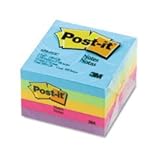
The third thing to remember when it comes to post-its is the size. Get the ordinary 3×3 inch size. The smaller size, for example, is just hard to use. Above all, don’t get fancy shapes. The fancy shapes are annoying and even harder to use than the small-sized ones. (In my view, at least!)

I suppose a word on color: get packs of multiple colors. I try to avoid yellow. Even though yellow is the standard color for post-its, I find it a bit too bland. So I suggest getting the 5-pack of varied colors.

Posts in This Series

  1. Recommended Productivity Tools: An Introduction
  2. The Tools You Need to Have (And Where to Keep Them)
  3. Recommended In Boxes
  4. Recommended Capture Journals
  5. Recommended Pens
  6. Recommended Pencils and Paper Pads
  7. Recommended Staplers, Staple Removers, and Tape
  8. Recommended Scissors, Letter Openers, and Post-Its
  9. Recommended Paper Clips and Super Glue
  10. Not Recommended: Desktop Organizer Things
  11. Recommended Chairs and Waste Baskets
  12. Recommended Labelers and File Folders
  13. Recommended File Cabinets and Bookshelves

Filed Under: Productivity Tools

Recommended Staplers, Staple Removers, and Tape

September 2, 2009 by Matt Perman

Post 7 in the series: Recommended Productivity Tools

Staplers

Yes, staplers are still relevant. For example, when most people need to read a longer document, they still prefer to print it out rather than read it on their computer. When you do this, you need to use a stapler.

When it comes to staplers, the key idea is: get one that’s sturdy. A lot of staplers are pretty weak. There is no need to get one of those. I recommend one like the above, which doesn’t feel like its going to fall apart when you use it. These are easy to find at Office Depot or Amazon.

The other rule of staplers is: don’t keep them on your desk. That unnecessarily clutters things up. They work fine in a drawer, even if you use it once a day or more.

Staple Removers

I actually don’t have a recommendation for a specific type here. The only thing I would say is: If you are going to have a stapler, it makes sense to have a staple remover. Store it right by the stapler in the drawer.

Tape

For tape I don’t actually have a recommendation, either. And as I mentioned in the introduction, I hardly ever use it. But on the occasions where I do need it, I don’t want to have to go looking for it. Since there’s room for it in the drawer by the stapler, I might as well have it around.

Posts in This Series

  1. Recommended Productivity Tools: An Introduction
  2. The Tools You Need to Have (And Where to Keep Them)
  3. Recommended In Boxes
  4. Recommended Capture Journals
  5. Recommended Pens
  6. Recommended Pencils and Paper Pads
  7. Recommended Staplers, Staple Removers, and Tape
  8. Recommended Scissors, Letter Openers, and Post-Its
  9. Recommended Paper Clips and Super Glue
  10. Not Recommended: Desktop Organizer Things
  11. Recommended Chairs and Waste Baskets
  12. Recommended Labelers and File Folders
  13. Recommended File Cabinets and Bookshelves

Filed Under: Productivity Tools

Recommended Pencils and Paper Pads

September 2, 2009 by Matt Perman

Post 6 in the series: Recommended Productivity Tools

Pencils

I use pencils for pretty much only one thing: underlining and writing notes in my books. Marking up your books is an important component of active reading. Hence, unless you only read books on the Kindle, it’s useful to have some pencils around.

When it comes to pencils, the main principle is: only use mechanical pencils. The non-mechanical kind needs to be sharpened, which means you need to keep a sharpener around, which makes things more complicated than you need.

The next thing to keep in mind with pencils is the size of the lead. As with pens, I recommend smaller. I get the 0.5mm pencils.

The last thing to keep in mind with pencils is that you want one that isn’t annoying to write with. I’ve found the Bic MatiC grip to work great. (I admit it — even though I don’t recommend Bic pens at all, their mechanical pencils are just fine). You can easily get them at Target, Office Depot, or even Amazon (and they qualify for free shipping if you have Amazon Prime).

Paper Pads

Paper pads are useful to have at your desk for capturing thoughts and such things. If you have a moleskine or other journal to serve as a capture tool, you’ll usually be using that (or your iPhone or computer). But it is still sometimes useful to be able to reach for a pad of paper.

I don’t recommend the full size legal pads, because they are so big. I recommend the smaller, 5×8 pads, which are easy to get at a place like Office Depot or Target. Here is an example.

Posts in This Series

  1. Recommended Productivity Tools: An Introduction
  2. The Tools You Need to Have (And Where to Keep Them)
  3. Recommended In Boxes
  4. Recommended Capture Journals
  5. Recommended Pens
  6. Recommended Pencils and Paper Pads
  7. Recommended Staplers, Staple Removers, and Tape
  8. Recommended Scissors, Letter Openers, and Post-Its
  9. Recommended Paper Clips and Super Glue
  10. Not Recommended: Desktop Organizer Things
  11. Recommended Chairs and Waste Baskets
  12. Recommended Labelers and File Folders
  13. Recommended File Cabinets and Bookshelves

Filed Under: Productivity Tools

  • « Previous Page
  • 1
  • …
  • 248
  • 249
  • 250
  • 251
  • 252
  • …
  • 309
  • Next Page »

About

What’s Best Next exists to help you achieve greater impact with your time and energy — and in a gospel-centered way.

We help you do work that changes the world. We believe this is possible when you reflect the gospel in your work. So here you’ll find resources and training to help you lead, create, and get things done. To do work that matters, and do it better — for the glory of God and flourishing of society.

We call it gospel-driven productivity, and it’s the path to finding the deepest possible meaning in your work and the path to greatest effectiveness.

Learn More

About Matt Perman

Matt Perman started What’s Best Next in 2008 as a blog on God-centered productivity. It has now become an organization dedicated to helping you do work that matters.

Matt is the author of What’s Best Next: How the Gospel Transforms the Way You Get Things Done and a frequent speaker on leadership and productivity from a gospel-driven perspective. He has led the website teams at Desiring God and Made to Flourish, and is now director of career development at The King’s College NYC. He lives in Manhattan.

Learn more about Matt

Newsletter

Subscribe for exclusive updates, productivity tips, and free resources right in your inbox.

The Book


Get What’s Best Next
Browse the Free Toolkit
See the Reviews and Interviews

The Video Study and Online Course


Get the video study as a DVD from Amazon or take the online course through Zondervan.

The Study Guide


Get the Study Guide.

Other Books

Webinars

Follow

Follow What's Best next on Twitter or Facebook
Follow Matt on Twitter or Facebook

Foundational Posts

3 Questions on Productivity
How to Get Your Email Inbox to Zero Every Day
Productivity is Really About Good Works
Management in Light of the Supremacy of God
The Resolutions of Jonathan Edwards in Categories
Business: A Sequel to the Parable of the Good Samaritan
How Do You Love Your Neighbor at Work?

Recent Posts

  • How to Learn Anything…Fast
  • Job Searching During the Coronavirus Economy
  • Ministry Roundtable Discussion on the Pandemic with Challies, Heerema, Cosper, Thacker, and Schumacher
  • Is Calling Some Jobs Essential a Helpful Way of Speaking?
  • An Interview on Coronavirus and Productivity

Sponsors

Useful Group

Posts by Date

Posts by Topic

Search Whatsbestnext.com

Copyright © 2026 - What's Best Next. All Rights Reserved. Contact Us.