Some good ideas on this by Gregory Ferenstein at Fast Company.
Recommended File Cabinets and Bookshelves
Post 13 in the series: Recommended Productivity Tools
File Cabinets
When it comes to file cabinets, there are two rules:
- Get ones that don’t screech when you open them.
- Get ones where the drawer comes all the way out.
This rules out the Office Depot el cheapo $30 excuses for file cabinets.
But, also at Office Depot, are the Hon 2-drawer and 4-drawer file cabinets. Hon is a decent brand, and their cabinets meet the above criteria. They are more expensive than the $30 excuses, but are the cheapest file cabinets I’ve found that don’t waste your time.
Get 2-drawer or 4-drawer, depending on your needs. Don’t get the lateral ones that go in sideways. Get the ones that go in normally. Here’s the specific one I recommend, in both 2-drawer and 4-drawer options:
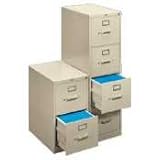
Now, I also recommend having some ordinary drawers at your desk, as I went over in the second post in this series. If your desk doesn’t have those built into it, there are some good drawer units that have two ordinary drawers on top, and then one file drawer below.
If that single file drawer gives you enough room for your files, then you don’t need to get an additional 2-drawer unit. Get the 2-drawer unit (or 4-drawer) if you need additional space.
Bookshelves
IKEA has fantastic bookshelves that look nice at a great price. I love IKEA in general for their motto “we’ll never stop making good design affordable” and for generally living up to it.
They’ve captured it well: keeping things affordable doesn’t mean getting ugly stuff. Good design can be obtained at a good price.
Here are the bookshelves that I use from IKEA:

You can also get the shorter 2-shelf unit, or some nice-looking cubed ones:

Conclusion
This brings us to the end of our series on recommended (physical) productivity tools. I will close the way I began: Having good tools matters.
First, because if you have good tools, you will often find yourself wanting to use them. And “one of the best tricks for enhancing your personal productivity is having tools you want to use.” Second, because bad tools get in the way. And third, because good tools in general make your workspace as a whole a place where you want to be.
Don’t be selectively strategic. Make your workspace work well for you in all respects — give it both an efficient setup and effective tools.
Posts in This Series
- Recommended Productivity Tools: An Introduction
- The Tools You Need to Have (And Where to Keep Them)
- Recommended In Boxes
- Recommended Capture Journals
- Recommended Pens
- Recommended Pencils and Paper Pads
- Recommended Staplers, Staple Removers, and Tape
- Recommended Scissors, Letter Openers, and Post-Its
- Recommended Paper Clips and Super Glue
- Not Recommended: Desktop Organizer Things
- Recommended Chairs and Waste Baskets
- Recommended Labelers and File Folders
- Recommended File Cabinets and Bookshelves
The Secret of those Who Do So Many Things
From The Effective Executive:
This is the “secret” of those people who “do so many things” and apparently so many difficult things. They do only one at a time. As a result, they need much less time in the end than the rest of us.
That last sentence is critical: “as a result, they need much less time in the end than the rest of us.”
Recommended Labelers and File Folders
Post 12 in the series: Recommended Productivity Tools
On Physical Filing
My series on filing is coming up (sorry for the delay). In it I’m going to cover both electronic and physical filing. As a general rule, obviously it makes sense to keep as much as possible electronically and minimize the amount of physical filing that you have to do.
But if you still receive some things made of actual paper that are worth keeping, there is still a need to keep physical files. And so you need to have a decent labeler and some file folders.
Labelers
David Allen has a great paragraph on why having a decent labeler matters. His words here actually illustrate very well the much broader point I’ve made regarding productivity tools in general — namely, that if you have tools that you enjoy using, you will use them more effectively.
Here’s what he says about labelers (on pages 93 and 100 of Getting Things Done):
The labeler is a surprisingly critical tool in our work. Thousands of executives and professionals and homemakers I have worked with now have their own automatic labelers, and my archives are full of their comments, like, “Incredible–I wouldn’t have believed what a difference it makes!” The labeler will be used to label your file folders, binder spines, and numerous other things.
….
Typeset labels change the nature of your files and your relationship to them. Labeled files feel comfortable on a boardroom table; everyone can identify them; you can easily see what they are from a distance in your briefcase; and when you open your file drawers, you get to see what looks almost like a printed index of your files in alphabetical order. It makes it fun to open the drawer to find or insert things.
Perhaps later in this new millennium the brain scientists will give us some esoteric and complex neurological explanation for why labeled files work so effectively. Until then, trust me. Get a labeler. And get your own. To make the whole system work without a hitch, you’ll need to have it at hand all the time, so you can file something whenever you want. And don’t share! If you have something to file and your labeler’s not there, you’ll just stack the material instead of filing it.
I recommend the Brother PT-1750. The reason is: It’s easy to figure out and it works well. Here it is:
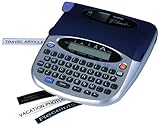
There’s just one problem: it appears to have been replaced by a more up to date model, so you can only get it used. The problem with the more up to date model is that it is harder to use. They added some features, and failed to integrate them in a usable way into the interface.
I think its replacement is the Brother PT-1880:
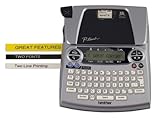
I have this newer version at work because I had to replace my labeler there, and the better earlier model had been discontinued by then.
Label Tape
Along with the labeler, you also need label tape. Get the half inch, black on white tape:
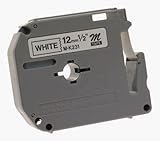
When it comes to label tape or any other supply, remember this principle: Get two. Keep one in use, and the second in with your extra supplies. When the one you are using runs out, grab the one in with the extras and replace it.
In other words: Always keep one extra, and replace it as soon as you use it. That way, you never run out — you’re always one ahead. This same principle works with everything — rock salt (if you have a water softener), furnace filters, everything.
File Folders
Get the third-cut file folders. Third-cut means the tab at the top will be in one of three slots. There is also five-cut, which I don’t recommend because it makes the tabs so small.
The file folders at Office Depot work just fine. Here is an example.
You can get plain ones or colored ones. If you get colored ones, just make sure to have a rhyme and reason to things and keep it simple. I’ll talk more about that in my posts on filing.
Posts in This Series
- Recommended Productivity Tools: An Introduction
- The Tools You Need to Have (And Where to Keep Them)
- Recommended In Boxes
- Recommended Capture Journals
- Recommended Pens
- Recommended Pencils and Paper Pads
- Recommended Staplers, Staple Removers, and Tape
- Recommended Scissors, Letter Openers, and Post-Its
- Recommended Paper Clips and Super Glue
- Not Recommended: Desktop Organizer Things
- Recommended Chairs and Waste Baskets
- Recommended Labelers and File Folders
- Recommended File Cabinets and Bookshelves
Doing One Thing at a Time is the Way to Get More Done, Not Less
From Drucker’s The Effective Executive:
Concentration is necessary precisely because the executive faces so many tasks clamoring to be done. For doing one thing at a time means doing it fast. The more one can concentrate time, effort, and resources, the greater the number and diversity of tasks one can actually perform.