What's Best Next

  • Newsletter
  • Our Mission
  • Contact
  • Resources
    • Productivity
    • Leadership
    • Management
    • Web Strategy
    • Book Extras
  • Consulting & Training
  • Store
    • Online Store
    • Cart
    • My Account
  • About
    • Our Mission
    • Our Core Values
    • Our Approach to Productivity
    • Our Team
    • Contact
You are here: Home / Archives for Matt Perman

How to Set Up Your Desk: Basic Principles

October 14, 2009 by Matt Perman

Post 2 in the series: How to Set Up Your Desk
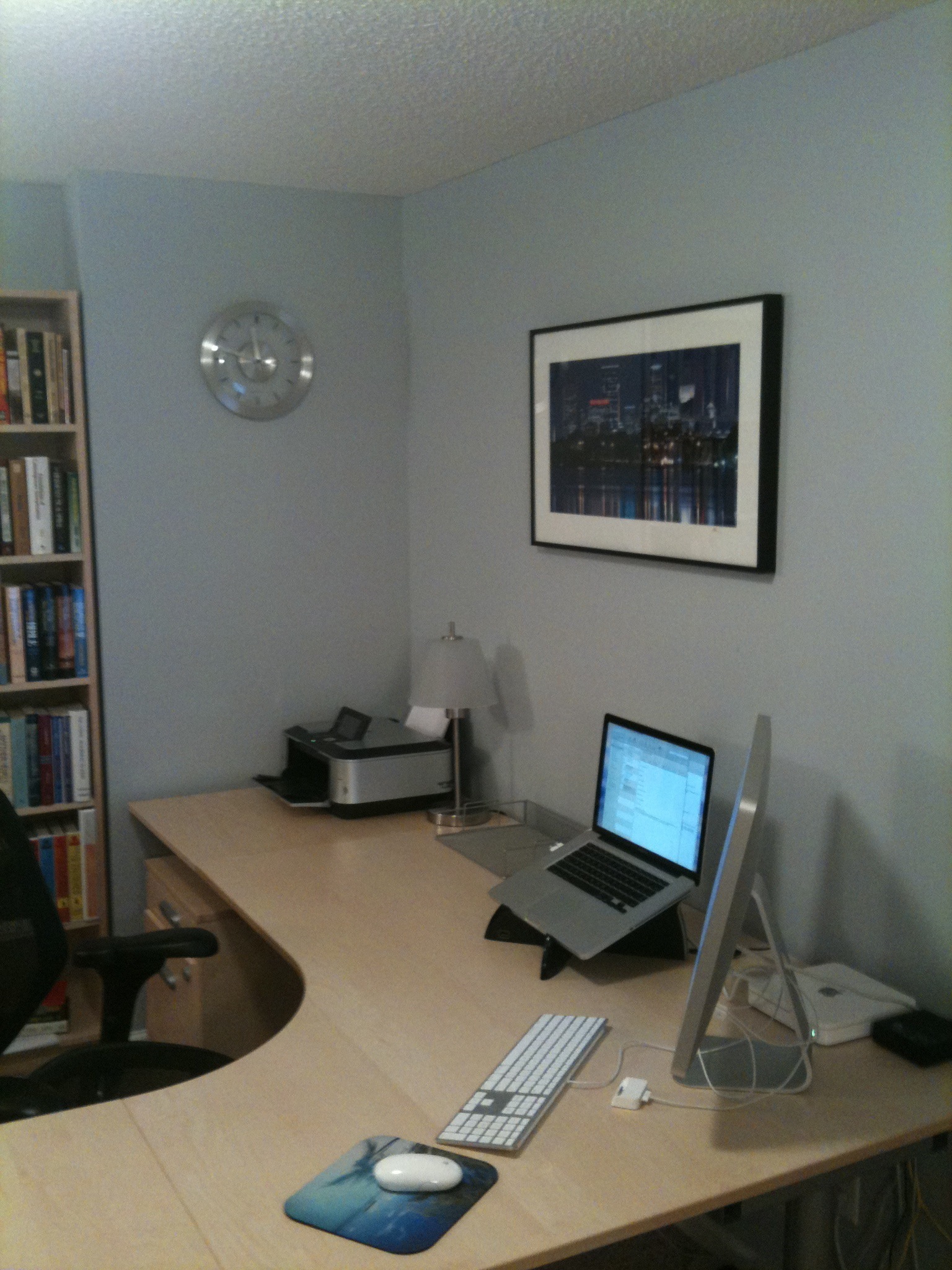
Before getting into the specifics of where to put your desk, how to organize and use your desktop and drawers most effectively, and how to set up the rest of your room/cubicle/work area, it is important to have some basic principles before us.

1. Your desk should be like a cockpit

This is perhaps the guiding principle here. You want your desk to be an effective, efficient “home base” for dealing with stuff and executing work. As such, it needs to be lean and function with ease. You want to be able to move quickly and with minimal drag.

This implies that you should have fingertip access to the things that you use and do most often, and enough surface area to do your work and create (temporary!) groupings as needed on the desktop (which you clear away when done — more on that later).

Clear space is good. Do not aim to occupy every fragment of space. A desk is for working, not storing stuff. So be a minimalist when it comes to what you have on your desk permanently.

This leaves room to spread things out when you are actually working and just plain gives room to breathe, which keeps your thinking from getting all walled up.

2. Everything at your desk falls into just a few categories

I covered the basics of how to understand the stuff at your desk in my second post on productivity tools and in my notes on workspace organization. But I did that mostly in anticipation of this series, so here’s the gist in a bit more detail.

Basically, if you have a context for understanding the types of stuff at your desk, you will be more likely to use it better and design your work area better. I think that this is more effective than just “tips on how to keep your desk clear.” The tips often don’t go to the core of the issue; they are just tips. The real solution is understanding.

There are two main categories of stuff at your desk: permanent stuff and temporary stuff.

Permanent stuff breaks down into four categories: equipment, supplies, decoration, and reference. Temporary stuff breaks down into: input to be processed, action reminders, and support materials.

We’ll cover permanent stuff first.

Equipment
Examples of equipment would be your computer monitor, keyboard, mouse, telephone, and in-box. As I’ll cover in the post on organizing your desktop, that’s about all the equipment you should have on your desk.

Things like staplers, label makers, and tape dispensers are also equipment, but should be in drawers (which I’ll also discuss). The principle is that you only keep on your desk the equipment that you use every day.

Supplies
Examples of supplies would be paper pads, pens, pencils, paper clips, rubber bands. Some of this could actually be considered equipment (pens, probably), but the point in regard to supplies is that they are things that need to be replenished.

This means that you keep at your desk only enough to meet your needs, and you store extras in a supply room, closet, overhead bin, or something like that. This again goes back to the principle of making your desk like a cockpit. Keep what you need there, but don’t use it to store a bunch of extra stuff, because that will clutter things up and your desk will no longer be smooth and functional.

I’ll talk about the supply area and how to set it up towards the end of the series. We’ll also cover where to keep your supplies that are kept at your desk (for example: only keep one or two pens on the desk and the rest in drawers) when we talk about the desktop and desk drawers. You can also learn more about this in my post The Tools You Need to Have (and Where to Keep Them).

Decoration
If you have some things on your desk that don’t seem to be doing anything, but you like to have them around, then they probably are serving as decoration. Decoration is the third category. It’s good to have this, just keep it to a minimum or you desk will end up overly cluttered.

Empty cans of Mountain Dew do not count as decoration.

Reference
The last category of permanent stuff is reference. This doesn’t go on your desktop, but in file cabinets and on bookshelves.

Transient Stuff
So we’ve seen the four categories of permanent stuff: equipment, supplies, decoration, and reference. Transient stuff breaks into three categories: input to be processed, action reminders, and project support materials.

Input to be processed goes in your in-box. That is, it goes in a specific spot — the in-box — rather than getting scattered over the desk or whole room.

Action reminders go in your task management software or, if you are paper-based, your planner. Support material goes in files or, if it is too big to fit in a file, on a project shelf or project area away from your desktop. And obviously most of your support material these days will be electronic.

Note that you keep action reminders and support materials off of your desktop, except when you are working on them. More on that below.

Equipped with the above categories, you can look around at your desk and identify if you really need to have the stuff that you do, and if you really need to have it where you do.

If you have something that doesn’t fall into any of these categories, then it is likely the final category that I didn’t mention: junk. Examples here would be pens that no longer work and who knows what else. If you have a lot of junk, getting rid of it will open up a lot of space.

Among the stuff that you should have around, knowing what type of thing it is also helps you know whether you should keep it close by or farther away. Equipment that you use every day can stay on the desktop, otherwise it goes into drawers. Keep at hand supplies that you use, but keep them in drawers. Keep extra supplies in a supply area. Have some decoration around, but don’t overdo it. And reference stuff is good to have, but it doesn’t go on your desktop.

3. The desk is for doing work, not storing work or reminding you of work

Let’s talk a bit more about how to handle the transient stuff. I’m going to go into more detail on this in the post on organizing and managing your desktop, so I’m risking a bit of repetition here, but I think a few words need to be said here as well.

I pointed out that action reminders go on lists and support material go in files or shelves, rather than the desktop. That’s because your desk is for doing work, not storing work or reminding you of work.

In other words, don’t manage your life from stacks, as I blogged on earlier today. Manage your life from lists. So don’t create stacks of stuff to remind you of the work that you have to do. That is the biggest reason that desks become cluttered. Put what you have to do on your action lists and put the support materials in pending files or, if they are too big, a project shelf.

When you are actually working on something, then you can create piles to orchestrate your work (for example, you can see an example of this in how I process my inbox). But get to the bottom of those piles before closing up shop for the day, or, if you can’t, put them away rather than keeping them around as reminders.

This goes to one of the purposes of having a desk: to create workspace. The desktop is for the work you are doing, not for storing the work that you have to do. If you use your desktop to store your work, it will not be as functional to you for actually doing your work. And you will always have nagging mental friction around you saying “you should be doing this, but you’re not.”

Therefore, do feel free to spread out your work and create piles when you are actually doing your work. That’s one of the reasons you have a desk. But when you are done, put things away. Don’t leave them out.

(This same principle can be applied electronically, by the way, with a few variations; you can see a glimpse of how to do this in my article on email, How to Get Your Email Inbox to Zero Every Day.)

4. All of the input that comes your way is either trash, information, or action

One more word here on the specific category of transient stuff that constitutes input to be processed. The input that comes your way falls into only one of three categories:

  1. Trash
  2. Information
  3. Action items

This makes it easier to know how to handle things. If an item is trash, toss it immediately.

If it is information, then either read it and then toss it or, if you want to keep it, read it and then file it (which brings up filing, which I will get to one of these days!). Don’t keep it on your desk. File it. File it. Don’t let clutter grow.

If it is an action item, then do it right away if it is less than two minutes. If it will take longer than two minutes, then put the action on one of your next action lists (if you don’t have any action lists, or aren’t clear on how to make the best use of them, I know that begs for a series of posts as well).

After putting the action on your list, if you still need the actual item, then put it with your support material, as discussed above, and make a note by the item on your list so you remember to bring it out when you work on that action.

In this way, you can process the new input that comes your way without resorting to turning your desk into a storage unit for stuff that you have to deal with.

5. Create work centers

Since a desk is for doing your work, you design the structure and flow of your desk to accommodate this. This is most effectively done if you think in terms of creating centers.

I’m going to talk more about how to set up these work centers are later in this series, in the post on organizing your actual desktop. But for now, I’ll point out that you create centers on your desktop, desk drawers, and file drawers.

On your desktop, the key centers will likely be phone center, computer center, capture tool center, and work center. There are also principles for best orchestrating the flow of work in your work center.

In your drawers, centers include: writing center, mailing/finance center (if needed), and stapler/filing center. In your files, the major divisions (= centers) are: pending, projects, operations, reference, and archive.

6. Use P-L-A-C-E to organize things intelligently

P-L-A-C-E, which comes from the book Organizing for Dummies (a really useful book, by the way), is a really helpful approach to organizing anything. So it comes in handy as a general approach to use when organizing your desk and office/cubicle.

I’ll talk more about how to specifically apply it when we talk later about the details of organizing your desktop and drawers. But for now, here’s the gist:

P urge. Get rid of what is unnecessary, especially pens that don’t work.

L ike with like. This means that you group like things together, just like you learned in high school English. This is really the central principle to organizing anything.

A ccess. When you have your groupings determined, you place them according to your access needs. This is why, for example, extra supplies go off in a supply closet or other out of the way place, rather than in your drawers. You don’t want stuff you don’t have to access as much getting in your way when accessing stuff you do need a lot.

C ontain. Don’t just let stuff run loose. Use drawer dividers and other types of containers when relevant.

E valuate. When you are done, step back and contemplate how you like it and make sure it works well for you. Make any adjustments.

7. Have interchangeable systems at home and work

David Allen is right when he says: “Don’t skimp on work space at home. It’s critical that you have at least a satellite home system identical to the one in your office.”

There are two key points there. First, many people are on top of things pretty well at work, but don’t apply those same principles at home. Be organized and effective both at work and at home. Don’t think you’re off the hook at home in the need to be effective (both in terms of executing efficient workflow and building solid relationships).

I like what David Allen says here on the value of setting things up well at home as well as work:

Many people I’ve worked with have been somewhat embarrassed by the degree of chaos that reigns in their homes, in contrast to their offices at work; they’ve gotten tremendous value from giving themselves permission to establish the same setup in both places. If you’re like many of them, you’ll find that a weekend spent setting up a home workstation can make a revolutionary change in your ability to organize your life. (Getting Things Done, 90).

Second, your system at home should mirror your system at work. This makes it easier, because you don’t have to learn one set of behaviors at work only to have to follow a different set of behaviors to use your desk/work area at home.

So, for example, my laptop goes at the same spot on the desk both at home and at work. My in box is in the same location. The drawers are in the same spots with similar stuff (with a few exceptions for stuff that I need to have at work that I don’t need at home, and a few accommodations to structural things that can’t be changed). And I have the same workflow pattern of left is for new stuff, right is for stuff to take somewhere, and so forth.

8. Have a mobile component

Last of all: You should not simply have a work center at home and work; you should also have a mobile dimension.

The mobile component basically consists of your briefcase with your laptop (I’ll maybe post in the future on how to set up your briefcase effectively). Here’s how David Allen puts the importance of this:

Many people lose opportunities to be productive because they’re not equipped to take advantage of the odd moments and windows of time that open up as they move from one place to another, or when they’re in off-site environments. The combination of a good processing style, the right tools, and good interconnected systems at home and at work can make traveling a highly leveraged way to get certain kinds of work done. (Getting Things Done, 90)

Now we have before us some of the primary principles governing how to set up and use your desk and general work area effectively. Now we’ll apply them specifically to where to put your desk and to organizing your desktop, drawers, and the rest of the room/cubicle.

Posts in This Series

  1. How to Set Up Your Desk: An Introduction
  2. How to Set Up Your Desk: Basic Principles
  3. Excursus: Against Desk Hotels
  4. The Four Ways to Configure a Desk
  5. Where to Put Your Desk
  6. What to Put on Your Desktop and How to Use It
  7. What to Put in Your Desk Drawers and How to Use Them
  8. The Rest of the Room: How to Set Up Your Office

Filed Under: Desk Setup

Operate from Lists, Not Stacks

October 14, 2009 by Matt Perman

From To Do Doing Done: A Creative Approach to Managing Projects and Effectively Finishing What Matters Most:

Think about what happens when you try to deal with a stack of paper. You take the first piece of paper off the stack, read it over, realize you can’t do anything about it right now, and put it back on one corner of your desk.

The next item, the same thing. The next item, you do what needs to be done and then realize that you may need the original piece of paper later, so you put it in a different stack on another corner of your desk.

You are just rearranging the stacks!

It’s impossible to prioritize a stack of paper. When you’re dealing with the stack, the most important item in that stack may be on the bottom … where you may never get to it.

The principle to overcome this is: Operate from lists, not stacks.

If you have any stacks, go through each item in them one at a time. Do what can be done in two minutes or less. When anything can’t be done in two minutes, then put it down as an action item on your next action list and then either toss the paper or, if you’ll need it when you do the action, put it in an action file and pull it out when you get to that action on your list.

If everything in the stack pertains to the same thing and it won’t fit in a file — for example, it’s a set of papers to be graded (let’s say you are a teacher) or the stack is really a big manuscript you have to read (let’s say you are an editor), then put the action which the stack represents on your next action list and put the stack on a shelf — off of your desktop. If desired, put in parentheses after the action item the location of the stack (which is really just “support material” for the action) to remind you that stack exists.

When you choose to do the action on your list, pull the stack off the shelf and do the work. When you are done with it for the day, put it back on the shelf and bring it back out the next time you work on that action.

Filed Under: Action Lists, Workflow

How to Set Up Your Desk: An Introduction

October 13, 2009 by Matt Perman

Post 1 in the series: How to Set Up Your Desk

How To Set Up Your Desk

              Buy the eBook

Note: This series is now available as an ebook at Amazon, with an expanded introduction (on how this relates to changing the world, and some other things), some various updates throughout, a list of further resources, and an appendix on how to turn an entire wall in your office into a white board (highly recommended!).

Posts in This Series

  1. How to Set Up Your Desk: An Introduction
  2. How to Set Up Your Desk: Basic Principles
  3. Excursus: Against Desk Hotels
  4. The Four Ways to Configure a Desk
  5. Where to Put Your Desk
  6. What to Put on Your Desktop and How to Use It
  7. What to Put in Your Desk Drawers and How to Use Them
  8. The Rest of the Room: How to Set Up Your Office

To follow up on our recent series on recommended productivity tools, we’re starting a series today on how to set up your desk.

Setting up your desk well is something that all of us have to deal with, and yet there is almost nothing out there on how to do it. There is some good advice here and there, but it is typically scattered. The only thorough treatment of desk setup that I know of is in Organizing for Dummies. The chapter is very helpful, but it is not online. There is no single online place to go to in order to get a clear view of how to make your desk work for you as effectively as possible.

So that’s what this series aims to do.

Why Desk Setup Matters
It makes sense to think through your workspace setup for several reasons.

First, when you have your desk set up well you minimize resistance to carrying out your work and thus can get more work done. That’s the key principle here: Set your desk up well in order to minimize resistance so that you can give your focus and energy to actually doing your work.

Second, you will simply work better if you have your desk set up well and know how to use it. Which is another one of my aims here: A desk is a workflow system. Therefore we ought to approach it with intentionality and purpose. We can be more effective when we know how to use our desks and are intentional, rather than ad hoc, because we deal with them every day and have to use them to get all sorts of important things done. The principle here is: Understand your tools and know how to make the most of them.

Third, when your desk is not set up well it creates drag and thus drains time, energy, and focus. I like how they put this in Organizing for Dummies:

You don’t need to be an efficiency expert, interior designer, or feng shui master specializing in the Chinese art of placement to know that the right work space can set you up for success, while a whatever approach to your workplace layout can sap your time, energy, concentration, and creativity” (p. 183).

Or, to put it another way: “Clutter sucks creativity and energy from your brain” (To Do Doing Done, p. 92).

Fourth, you use your desk about every day, and knowing how to use it is not hard to figure out. So the benefits you get from this are large, but the cost involved is small.

Fifth, it makes work more fun when you know how to use your desk. A well-run desk is a work of art!

Who Needs to Do This?
Not just people that work in an office. I like how David Allen puts it:

A functional work space is critical. If you don’t already have a dedicated work space and in-basket, get them now. That goes for students, homemakers, and retirees, too. Everyone must have a physical locus of control from which to deal with everything else. (Getting Things Done, 89.)

I got interested in this subject years ago largely as an outgrowth of implementing GTD. After putting the task management systems in place, it made sense to make the other aspects of my work as smooth and efficient as possible as well.

So I did some reading on desk setup, engaged in some trial and error, and developed some basic principles. (And then kept going with this trajectory in regard to every other room in my house so that I could minimize drag wherever I could — yes, a bit strange, I know!)

On Flexibility

I don’t want to say here that there is only one right way to set up your desk. There are some pretty tricky situations given the setups that are often thrust upon us, such as odd-shaped cubicles or, if we have an office, uncooperative room layouts. And personal preference also plays a huge role as well.

The problem I found, though, is that these factors lead many to give the advice of “just do what works for you.” Which really gives no guidance at all. The result, I found, was that I had to think about my desk a lot more than I wanted.

So although individual situations and preferences vary, there are principles for how to do this more effectively than otherwise. The key is to apply the principles in light of your own individual preferences and specific situation.

To summarize: Setting up your desk well and knowing how to use it minimizes resistance to your work and makes it more enjoyable. The result is that you are more drawn to actually do your work, giving you a productivity edge that also makes work feel less like work. And you won’t have all sorts of piles getting in your way.

Filed Under: Desk Setup

The Effectiveness of Your System is Inversely Proportional to Your Awareness of It

October 13, 2009 by Matt Perman

From David Allen’s Ready for Anything: 52 Productivity Principles for Work and Life (p. 96):

When you have to focus on your system, you are detouring energy that could be used to create and produce with your system.

The objective of system installation, change, or enhancement is to get “system” off your mind again as soon as possible.

The better your systems, the more you don’t know you have them. The less attention you pay to them, the more functional they probably are. The only time you will notice them is when they don’t work or when you have to be too conscious about your use of them. You want to be working, doing, thinking, creating, and dealing with things — not focused on how you’re doing them.

You want to enjoy driving your car in the countryside without thinking about how to shift gears or work the climate control.

Creating smoothly running silent systems is often the greatest improvement opportunity for enhanced productivity.

Nine out of ten times, people have workflow systems that don’t work, because they are too much work.

Most of the organizing gear and software sold in the last twenty-five years makes sense conceptually but doesn’t function as fast as what people are trying to coordinate. When the amount of what has to be managed increases in speed and volume, a system will start to fall apart if its design is flawed or the habits of the operator are not grooved on “automatic.”

Filed Under: Workflow

The Mental Price of Multitasking

October 10, 2009 by Matt Perman

Stanford University News summarizes the findings from a recent study on multitasking. Here are some key excerpts:

People who are regularly bombarded with several streams of electronic information do not pay attention, control their memory or switch from one job to another as well as those who prefer to complete one task at a time, a group of Stanford researchers has found.

High-tech jugglers are everywhere – keeping up several e-mail and instant message conversations at once, text messaging while watching television and jumping from one website to another while plowing through homework assignments.

But after putting about 100 students through a series of three tests, the researchers realized those heavy media multitaskers are paying a big mental price.

….

“We kept looking for what they’re better at, and we didn’t find it,” said Ophir, the study’s lead author.

….

“When they’re in situations where there are multiple sources of information coming from the external world or emerging out of memory, they’re not able to filter out what’s not relevant to their current goal,” said Wagner, an associate professor of psychology. “That failure to filter means they’re slowed down by that irrelevant information.”

Filed Under: 1 - Productivity

My Interview with Tim Challies

October 7, 2009 by Matt Perman

I recently did an interview for Tim Challies’ blog on Desiring God, where my role is senior director of strategy.

I talk about how DG began, our core purpose, our philosophy of being here to serve rather than for how we can benefit, why we post everything online for free, and some thoughts on organizational effectiveness.

In regards to the latter, one of the things I talk about is how an organization should navigate the future in light of the fact that it cannot be known with clarity — and therefore detailed strategic blueprints become outdated almost right away. I discuss three ways that we do this:

  • Evolutionary progress, which happens incrementally and organically (rather than according to a predetermined plan) through the principle of “try a lot of stuff and keep what works.”
  • Building on the strengths of the staff.
  • Intentional and planned progress, through the concept of BHAGs (big hairy audacious goals) that paint in broad strokes the envisioned future.

The core idea here is to combine incremental progress, which progresses organically in response to the environment and needs as you experience them, with intentional and bold goals (BHAGs) that paint in broad strokes but do not blueprint things out in detail. This provides intentionality about the future without attempting to script everything out, so that the organization can remain flexible according to reality as it actually is while still progressing toward a bold envisioned future.

There is a great quote in Built to Last on how Jack Welch utilized both of these concepts effectively at GE, which I think explains the concept very well:

Instead of directing a business according to a detailed … strategic plan, Welch believed in setting only a few clear, overarching goals. Then, on an ad hoc basis, his people were free to seize any opportunities they saw to further those goals. This crystallized in his mind after reading Johannes von Moltke, a nineteenth century Prussian general influenced by the renowned military theorist Karl von Clausewitz, who argued that detailed plans usually fail, because circumstances inevitably change.

Filed Under: Non-Profit Management

Why Being Organized Matters

October 5, 2009 by Matt Perman

Being organized matters because it reduces the friction in getting things done.

In other words:

Most people act when it’s easy to do so. The better organized you are, the easier it is to act and the greater the tendency for you to do those things that should be done when they should be done, whether you like to or not. (The Personal Efficiency Program: How to Stop Feeling Overwhelmed and Win Back Control of Your Work, p 4.)

Filed Under: a Productivity Philosophy

On Grasshoppers and Email

October 1, 2009 by Matt Perman

When I go running, there is a field on my route that is filled with grasshoppers. The field looks ordinary from a distance. But once I get to it, grasshoppers start jumping out everywhere.

The first few times that I went through it I would speed up to try and get away from them. But I could never outrun the grasshoppers. They would just jump out as I went along, regardless of how fast or slow I was going. They jumped out where I was precisely because I was there. Going faster didn’t get me past the grasshoppers; it just made them jump out sooner.

So this immediately made me think of email. Email contains a paradox, like these grasshoppers: Going faster doesn’t mean you’ll get less. In fact, it might mean that you’ll get even more, because email responds to your presence, just like the grasshoppers.

So if you try to overcome email overload by doing email faster and more often, you won’t end up getting ahead. You’ll just end up with a lot more email to keep up with.

If you want more email, that’s fine. I’m not against email, and a lot of important work gets done through it. (And I probably don’t say that enough.) But if you want to preserve a good chunk of time for other responsibilities that you (hopefully) have, then the solution is to reduce your number of email cycles.

In other words, if you want to decrease the amount of email that you have to attend to, the main solution is not to go faster.

Yes, you should go faster and be more efficient at processing your email. But if that’s all you do, you’ll just see more email coming your way than you would have before. What you need to do is both become more efficient at processing email and at the same time decrease the number of times that you check email each day.

In other words, the way to create more time for other things is to decrease the number of email cycles in your routine.

Last of all, an objection. Someone will say “but if I check email less, then I’ll be less responsive.” Well, that’s probably true. I’m not saying that you have to do this. But realize that this trade-off exists on both sides of the equation. For if you choose to be almost immediately responsive with email, then you will get less long-term and important non-email stuff done. And that’s a problem, too.

It’s really up to you. There’s not necessarily a right or wrong here. It depends upon the nature of your responsibilities, your strengths, and what your organization needs you to be focusing on. Things may also fluctuate for the same person from season to season. (And, it’s worth pointing out that you can probably find a balance that preserves a good level of responsiveness even if it is less than you might initially default to.)

You make the call. Just be aware of the likely trade-off. If you end up doing less non-email work in order to give more time and attention to email, just make sure that you are doing that on purpose rather than automatically assuming that that is the way it has to be.

Filed Under: Email

The Universal Requirements for a Visionary Company

October 1, 2009 by Matt Perman

From Jim Collins’ Built to Last: Successful Habits of Visionary Companies:

A company must have a core ideology [core purpose plus core values] to become a visionary company. It must also have an unrelenting drive for progress. And finally, it must be well designed as an organization to preserve the core and stimulate progress, with all the key pieces working in alignment.

These are universal requirements for visionary companies. They distinguished visionary companies a hundred years ago. They distinguish visionary companies today. And they will distinguish visionary companies int he twenty-first century.

However, the specific methods visionary companies use to preserve the core and stimulate progress will undoubtedly change and improve. BHAGs [huge, audacious goals], cult-like cultures, evolution through experimentation, home-grown management, and continuous self-improvement — these are all proven methods of preserving the core and stimulating progress. But they are not the only effective methods that can be invented.

Companies will invent new methods to complement these time-tested ones. The visionary companies of tomorrow are already out there today experimenting with new and better methods. They’re undoubtedly already doing things that their competitors might find odd or unusual, but that will someday become common practice.

And that’s exactly what you should be doing in the corporations [and organizations] you work with — that is, if you want them to enter the elite league of visionary companies. It doesn’t matter whether you are an entrepreneur, manager, CEO, board member, or consultant. You should be working to implement as many methods as you can think of to preserve a cherished core ideology that guides and inspires people at all levels. And you should be working to create mechanisms that create dissatisfaction with the status quo and stimulate change, improvement, innovation, and renewal — mechanisms, in short, that infect people with the spirit of progress…. Use the proven methods and create new methods. Do both.

Filed Under: b Vision, Business Philosophy

Don't Win the Fight but Lose the Customer

September 30, 2009 by Matt Perman

A good post from Seth Godin on the true meaning of “the customer is always right” and how not to fire your customers:

Does it really matter if you’re right?

Given the choice between acknowledging that your customer is upset or proving to her that she is wrong, which will you choose?

You can be right or you can have empathy.

You can’t do both.

It’s not the nature of capitalism to need to teach people a lesson, it’s the nature of being a human, we just blame it on capitalism. In fact, smart marketers understand that the word ‘right’ in “The customer is always right” doesn’t mean that they’d win in court or a debate. It means, “If you want the customer to remain a customer, you need to permit him to believe he’s right.”

If someone thinks they’re unhappy, then you know what? They are.

Trying say this to yourself: I have no problem acknowledging that you’re unhappy, upset or even angry. Next time, I’d prefer to organize our interaction so you don’t end up feeling that way, and I probably could have done it this time, too. You have my attention and my empathy and I value you. Thanks for being here.

If you can’t be happy with that, then sure, go ahead and fire the customer, cause they’re going to leave anyway.

Filed Under: Marketing

  • « Previous Page
  • 1
  • …
  • 116
  • 117
  • 118
  • 119
  • 120
  • …
  • 151
  • Next Page »

About

What’s Best Next exists to help you achieve greater impact with your time and energy — and in a gospel-centered way.

We help you do work that changes the world. We believe this is possible when you reflect the gospel in your work. So here you’ll find resources and training to help you lead, create, and get things done. To do work that matters, and do it better — for the glory of God and flourishing of society.

We call it gospel-driven productivity, and it’s the path to finding the deepest possible meaning in your work and the path to greatest effectiveness.

Learn More

About Matt Perman

Matt Perman started What’s Best Next in 2008 as a blog on God-centered productivity. It has now become an organization dedicated to helping you do work that matters.

Matt is the author of What’s Best Next: How the Gospel Transforms the Way You Get Things Done and a frequent speaker on leadership and productivity from a gospel-driven perspective. He has led the website teams at Desiring God and Made to Flourish, and is now director of career development at The King’s College NYC. He lives in Manhattan.

Learn more about Matt

Newsletter

Subscribe for exclusive updates, productivity tips, and free resources right in your inbox.

The Book


Get What’s Best Next
Browse the Free Toolkit
See the Reviews and Interviews

The Video Study and Online Course


Get the video study as a DVD from Amazon or take the online course through Zondervan.

The Study Guide


Get the Study Guide.

Other Books

Webinars

Follow

Follow What's Best next on Twitter or Facebook
Follow Matt on Twitter or Facebook

Foundational Posts

3 Questions on Productivity
How to Get Your Email Inbox to Zero Every Day
Productivity is Really About Good Works
Management in Light of the Supremacy of God
The Resolutions of Jonathan Edwards in Categories
Business: A Sequel to the Parable of the Good Samaritan
How Do You Love Your Neighbor at Work?

Recent Posts

  • How to Learn Anything…Fast
  • Job Searching During the Coronavirus Economy
  • Ministry Roundtable Discussion on the Pandemic with Challies, Heerema, Cosper, Thacker, and Schumacher
  • Is Calling Some Jobs Essential a Helpful Way of Speaking?
  • An Interview on Coronavirus and Productivity

Sponsors

Useful Group

Posts by Date

Posts by Topic

Search Whatsbestnext.com

Copyright © 2026 - What's Best Next. All Rights Reserved. Contact Us.