What's Best Next

  • Newsletter
  • Our Mission
  • Contact
  • Resources
    • Productivity
    • Leadership
    • Management
    • Web Strategy
    • Book Extras
  • Consulting & Training
  • Store
    • Online Store
    • Cart
    • My Account
  • About
    • Our Mission
    • Our Core Values
    • Our Approach to Productivity
    • Our Team
    • Contact

What's at Stake with Multitasking?

April 8, 2009 by Matt Perman

The Lifehacker book notes that:

It takes 15 minutes of uninterrupted time to get into “the zone,” that wonderfully productive place where you lose all sense of time and space and get a job done.

So what happens if you multitask? You will never get into the zone. And if you never get into the zone, you will miss out on the best and most productive experience in work.

The experience of being in the zone is the same thing that Mihaly Csikszentmihalyi wrote about in his book Flow: The Psychology of Optimal Experience. “Flow” is the state (citing Lifehacker here) when “you’re fully immersed in your task, effortlessly successful, and oblivious to time and external factors.”

You get way more done — and it is far more enjoyable — when you are in this state of mind called flow. Csikszentmihalyi calls it optimal experience and actually regards it as a central feature of happiness:

The best moments of our lives usually occur when a person’s body or mind is stretched to the limits in a voluntary moment to achieve something difficult and worthwhile. Optimal experience is thus something we make happen…

Multitasking prevents you from getting into this state of optimal experience because the state of flow comes when you are fully immersed in something difficult and worthwhile. That is, it comes through involved mental (or physical) tasks. Multitasking keeps you from being immersed and fully involved in your task, and thus is contrary to the state of flow.

We should engineer our work days to enable us to get into the zone as much as possible. This increases your productivity (I would say, at least by a factor of 4 — but that’s just a guess) and your enjoyment. To do this, “block out irrelevant distractions and let in only the information you need to get the job done” (Lifehacker, p. 140). Chapter 5 of Lifehacker gives lots of strategies for this. One of the biggest, which I’ve blogged about previously, is not to check email continuously.

Now, let me say one more thing. There may be an impression out there that those who choose to focus on one thing at a time are somehow “less capable” than those who pride themselves on multitasking. So let me address that.

If we want to get technical, the reason you can’t multitask with highly difficult and complex tasks is because the single tasks themselves involve so many components that you are really doing something like multitasking within that task. Therefore, you have no room for multitasking with outside factors which are beyond the scope of the task.

Let me give an example using my favorite quarterback, Kurt Warner. When he is on the field and drops back to pass, he has to keep a hundred different things in view. He has to know where his receivers are (and should be), where the defenders are, what the defenders may be planning to do, how significant the threat of a sack is, and so forth. The task of completing a pass is so complex that it is, in a sense, a form of multitasking within itself. Keeping all factors in view involves one’s whole attention.

Therefore, there is no room for Warner to check his Blackberry or iPhone when he is out on the field. Further, there is not even room for him to look up in the stands and wave to his wife during the middle of a play. The task requires 100% concentration.

The world of knowledge work is no different. If it is different for you… how do I say this? If it is different for you — that is, if as a rule you never feel the need to get into the zone — you are probably doing something wrong.
Filed Under: 1 - Productivity

Set up a Morning Dash

April 7, 2009 by Matt Perman

Here’s a helpful tip from the Lifehacker book I mentioned in the previous post. Hack number 23 is “Set up a Morning Dash.”

Some days (most days?) it can seems almost impossible to get to anything on your next action list. Now, one of the very reasons that you have a next action list is to have some lines in the sand that enable you to say “no” to less important things that come up, so that you can focus on what you’ve determined to be most important.

But unexpected gear shifts will happen — which leads to another beauty of having a next action list: it enables you to re-evaluate and re-prioritize at a moment’s notice.

However, it remains true that we often feel that we have been unable to make the progress on things that we think we should. That’s where the morning dash comes in.

Gina Trapani writes:

There is one way to ensure that you’ll knock at least one thing off your list: dedicate the first hour of your day to your most important task before you check your email, or your paper inbox, or go to any meetings. …

Choose one task — even a small one — and tackle it first thing. Accomplishing something out of the gate sets the tone for the rest of your day and guarantees that no matter how many fires you’re tasked with putting out the minute you open your email client, you still can say you got something done.

Julie Morgenstern, author of Never Check E-Mail In the Morning, makes the same point, which Trapani also quotes:

Change the rhythm of the workday by starting out with your own drumbeat….When you devote your first hour to concentrated work — a dash — the day starts with you in charge of it rather than the other way around. It’s a bold statement to the world (and yourself) that you can take control, pull away from the frenetic pace, and create the time for quiet work when you need it. In reality, if you don’t consciously create the space for the dashes, they won’t get done.

This is good advice. Peter Drucker himself suggests something similar, counseling us in The Effective Executive to “consolidate your time” into as large of chunks as possible. He writes:

The effective executive executive knows that he has to consolidate his discretionary time. He knows that he needs large chunks of time and that small driblets are no time at all. Even one quarter of the working day, if consolidated in large time units, is usually enough to get the important things done. But even three quarters of the working day are useless if they are only available as fifteen minutes here or half an hour there. (p. 49)

I’m on hour 3 of my morning dash right now — and I still feel like I need more time. But, time to get on with the rest of the day.

Filed Under: 1 - Productivity

Upgrade Your Life: The Lifehacker Guide to Working Smarter, Faster, Better

April 7, 2009 by Matt Perman

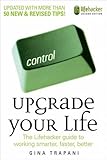
Last week I was finally able to spend a good chunk of time reading through Upgrade Your Life: The Lifehacker Guide to Working Smarter, Faster, Better, by Gina Trapani.

Gina is the founding editor of Lifehacker.com, the very helpful blog on software and productivity. I found the book to be just as helpful — and enjoyable — as the website. It is filled with 166 brief but very helpful “hacks” for making technology work for you more effectively.

If you get a chance, the book is worth checking out. If I get the chance, I’ll be doing some posts on it as well.

Filed Under: 1 - Productivity

Microsoft Surface

April 6, 2009 by Matt Perman

Here are some helpful, short videos that show what Microsoft Surface can do.

Surface is a 30-inch tabletop display that enables multiple people to interact with digital information. There is no mouse and no keyboard. Instead, you just grab digital content with your hands and move information between objects with simple gestures and touches.

It will be great as human to digital interfaces move more and more in this direction (and hopefully Apple will take the lead here; the iPhone is a great start). Mouses and keyboards are a limiting factor on how quickly and easily we can deal with information. We need digital interfaces that are more like the physical world if we are going to be able to keep up with the pace of opportunity and stay sane.

There will always be some place for the keyboard — namely, when you actually need to type. But a primarily touch-based, multi-dimensional interface for interacting with our computers will make both the routine and creative dimensions of work much more smooth and intuitive. The result will be that we can focus more and more on the actual work, rather than operating within the limitations of our interfaces.

Filed Under: Technology

Flutter: The New Twitter

April 6, 2009 by Matt Perman

At 140 characters, perhaps Twitter posts are just too long for those who really want to be productive. Enter Flutter. Flutter limits posts to 26 characters, thus taking us from microblogging to nanoblogging.

This video spoof on Twitter was pretty funny:

(By the way, you can follow me on Twitter at twitter.com/mattperman.)

Filed Under: Technology

Death by Meeting?

April 6, 2009 by Matt Perman

Seth Godin posted last week on Getting Serious About Your Meeting Problem. It was a good post, and brings up some things I’d like to develop further off and on.

For a longer treatment of the subject — and from a somewhat unexpected angle — I’d also recommend Patrick Lencioni’s Death by Meeting.

Lencioni’s premise in Death by Meeting is not what you might expect. He doesn’t jump on the usual bandwagon of trashing on meetings. In fact, he believes that the mindset of “if I didn’t have to go to meetings, I’d like my job more” is not a good one. It would be like a surgeon saying, “If I didn’t have to operate on people, I’d like my job more.”

So instead, Lencioni’s point is that we need to make meetings better. In fact, he argues that meetings should be more interesting than movies.

The reason most meetings are bad is that they lack two things: (1) context and (2) drama. The way to make meetings better, then, is to provide context and drama.

To provide context, he lays out the different kinds of meetings that should exist, and argues that harm is done when we combine incompatible things into the same meeting. For example, tactical and strategic meetings should be kept distinct. You shouldn’t bog down a strategic meeting with tactical issues.

Beyond this, meetings ought to be more interesting than movies because they actually affect reality. They key to making them so is drama. Not artifical drama, for sure. But by being willing to engage in constructive ideological conflict and mine for differences, meetings become naturally engaging, compelling, and energizing.

Filed Under: Meetings

The Art of the Self-Imposed Deadline

April 2, 2009 by Matt Perman

Steven DeMaio has a helpful article on The Art of the Self-Imposed Deadline.

Before you check that out, it’s worth asking how self-imposed deadlines relate to GTD. For, on the face of it, self-imposed deadlines actually seem contrary to the “getting things done” approach. Here’s a quick word on that.

One of the principles of GTD is that you should only put deadlines on stuff that really has a deadline. This preserves your “hard landscape” so that you can make effective decisions, knowing what really is on a timeline and what isn’t.

It would be easy to take that counsel and then conclude that, therefore, we should never have self-imposed deadlines — that somehow self-imposed deadlines “don’t count” or “aren’t real,” but deadlines imposed by others somehow are.

But this would be a mistake. It would be a mistake to think that self-imposed deadlines aren’t valid, but deadlines imposed by others are.

The reason it is so easy to fall think that self-imposed deadlines aren’t real is that we tend to think that a self-imposed deadline is arbitrary. After all, we’re the one setting it. So why does it have to be Friday rather than next Wednesday?

But if you think about it, the same charge of arbitrariness could be made for deadlines that are assigned to us as well. After all, some person decided on that deadline as well. Why does that make it any less arbitrary than when we set the deadline ourselves?

The fact is that deadlines are a convention for keeping your work going along at the right clip. It is true that sometimes a deadline is an indication that things will completely fall apart if it is not made (for ex: I have to be at the airport in 1 hour, and here I am typing this blog post — better get this wrapped up!).

But the main value of deadlines is that they are a way to keep all your work from hitting at once, and to coordinate your work with the expectations of others so that they can fit your deliverables into their own consequent work in an orderly way. When this framework is behind your deadlines, they are not “arbitrary” but are in fact quite useful — and necessary.

In fact, without some manner of self-imposed deadlines on your work, you’ll either never get anything done, or you will never get any rest (because when nothing has a due date, your mind tends to feel like everything is always due right away — so you’ll feel like you should always be working).

The trick is, just don’t set too many deadlines. Use this tool, but use it wisely.

Well, with this said, go take a look at Steven DeMaio’s four tips for learning The Art of the Self-Imposed Deadline.

Filed Under: 1 - Productivity

Key Notes from the Art of Project Management

March 31, 2009 by Matt Perman

Scott Berkun’s book The Art of Project Management (now issued in a new edition and renamed Making Things Happen: Mastering Project Management (Theory in Practice)) is the best book I’ve read on project management. It is fantastically helpful.

The other day I came across these brief notes I had jotted down a while ago from the book. They are very incomplete, hitting on just a few of the key things that stood out to me.

But sometimes, that’s what can be most helpful. So here they are, in case they might be timely for you as well:

  • Requirements vs. specifications. Requirements are the what, and specifications the how.
  • The three perspectives: Business (including marketing), technology, and user. User is most important but also most often neglected.
  • The importance of planning: “Plans provide an opportunity to review decisions, expose assumptions, and clarify agreements between people and organizations. Plans act as a forcing function against all kinds of stupidity because they demand the important issues be resolved while there is time to consider other options. As Abraham Lincoln said, ‘If I had six hours to cut down a tree, I’d spend four hours sharpening the axe,’ which I take to mean that smart preparation minimizes work.” (p. 41)
  • On thinking outside the box. It’s not always best to say “think outside the box.” Eliminating boxes is not necessarily the hard part—it’s knowing which boxes to use and when to use them. Constraints are ever present. Art of Project Management, 93. “Do whatever you want with the box. Think in the box, out of the box, on the box, under the box, tear apart and make a fire out of the box, whatever, as long as you manage to solve the problems identified as the goals for the project” (p. 94).
  • Where good ideas come from. To generate good ideas, ask good questions.
  • Open issues list: “An open issue is anything that needs to be decided or figured out but hasn’t happened yet. It’s essentially a list of questions, and it should encompass anything that needs to be done, prioritized by its potential impact on engineering” (123).
  • Different types of requirements and specs: Requirements, feature spec, technical specs, work-item list (the description of each programming assignment needed to fulfill the feature spec), and test criteria and milestone exit criteria (prioritized cases for the new functionality, along with goals for how well the code needs to perform on those cases to meet the quality goals for the milestone).

Filed Under: Project Management

Facebook Connect

March 30, 2009 by Matt Perman

For those of you who haven’t yet informed yourself on what Facebook Connect is, here is a helpful summary.

Here’s the brief summary:

Facebook Connect is the next evolution of Facebook Platform, enabling you to integrate the power of Facebook Platform into your own site. Enable your users to:

  • Seamlessly “connect” their Facebook account and information with your site
  • Connect and find their friends who also use your site
  • Share information and actions on your site with their friends on Facebook

I think there are some very exciting things that will be happening because of this!

Filed Under: Technology

Estimate the Time on Your Projects

March 30, 2009 by Matt Perman

It can be useful to do a quick estimate of the time it will take to accomplish each of the projects on your project list.

I’ve never really done that before. I used to think that doing so would be an unnecessary exercise that would only serves to take time away from actually getting my projects done. And, beyond that, something that would evoke stares of disbelief from any who heard about it (“you actually do that?? what a waste of time! I just get everything done without any effort, and certainly without wasting in time in trivia like that!).

But I just did it (took less than 2 minutes) and discovered that I have about 63 hours of work staring at me simply from my list of current projects.

That’s very useful to know!

Assuming that I could devote 6 hours a day simply to project work (no email, no new tasks that come up, no meetings), it would take me just over two work weeks to finish that (assuming working only 40 hour weeks). And then, after that, there are a bunch of upcoming projects waiting in the wings.

When I factor in the doing of operational and routine things, that’s probably about a month’s worth of work.

It might be easy to conclude, then, that I have too much work on my current list.

But that’s not necessary too much — it just says that I am looking out about a month at a time on my projects list (not in due dates — many of the due dates are farther out — but in terms of work length). Having about a month active at a time is probably not necessarily a bad thing.

Now, I do try to keep my projects list as short as possible, and so maybe a month’s worth is to much to have on there. I do have more projects than normal active right now.

But the main issue is: Without having done this estimate, I wouldn’t know what quantity of work my projects list really represents.

But now that I know that, I can ask the next question: Is this what I really want to get done over the next month? If I did no other projects over the next month, would I be happy with the result? If not, what should I take off the list, and what should go on in its place?

The payoff in those questions is very high. But if I had not estimated the length of my current projects, my default would have been simply to try to cram new stuff in when it came up — without really knowing the trade-off in time delays it would cause.

Now, I can be more informed about those decisions and make sure I really am getting the right things done over the next month.

Filed Under: Project Planning

  • « Previous Page
  • 1
  • …
  • 135
  • 136
  • 137
  • 138
  • 139
  • …
  • 155
  • Next Page »

About

What’s Best Next exists to help you achieve greater impact with your time and energy — and in a gospel-centered way.

We help you do work that changes the world. We believe this is possible when you reflect the gospel in your work. So here you’ll find resources and training to help you lead, create, and get things done. To do work that matters, and do it better — for the glory of God and flourishing of society.

We call it gospel-driven productivity, and it’s the path to finding the deepest possible meaning in your work and the path to greatest effectiveness.

Learn More

About Matt Perman

Matt Perman started What’s Best Next in 2008 as a blog on God-centered productivity. It has now become an organization dedicated to helping you do work that matters.

Matt is the author of What’s Best Next: How the Gospel Transforms the Way You Get Things Done and a frequent speaker on leadership and productivity from a gospel-driven perspective. He has led the website teams at Desiring God and Made to Flourish, and is now director of career development at The King’s College NYC. He lives in Manhattan.

Learn more about Matt

Newsletter

Subscribe for exclusive updates, productivity tips, and free resources right in your inbox.

The Book


Get What’s Best Next
Browse the Free Toolkit
See the Reviews and Interviews

The Video Study and Online Course


Get the video study as a DVD from Amazon or take the online course through Zondervan.

The Study Guide


Get the Study Guide.

Other Books

Webinars

Follow

Follow What's Best next on Twitter or Facebook
Follow Matt on Twitter or Facebook

Foundational Posts

3 Questions on Productivity
How to Get Your Email Inbox to Zero Every Day
Productivity is Really About Good Works
Management in Light of the Supremacy of God
The Resolutions of Jonathan Edwards in Categories
Business: A Sequel to the Parable of the Good Samaritan
How Do You Love Your Neighbor at Work?

Recent Posts

  • How to Learn Anything…Fast
  • Job Searching During the Coronavirus Economy
  • Ministry Roundtable Discussion on the Pandemic with Challies, Heerema, Cosper, Thacker, and Schumacher
  • Is Calling Some Jobs Essential a Helpful Way of Speaking?
  • An Interview on Coronavirus and Productivity

Sponsors

Useful Group

Posts by Date

Posts by Topic

Search Whatsbestnext.com

Copyright © 2026 - What's Best Next. All Rights Reserved. Contact Us.