What's Best Next

  • Newsletter
  • Our Mission
  • Contact
  • Resources
    • Productivity
    • Leadership
    • Management
    • Web Strategy
    • Book Extras
  • Consulting & Training
  • Store
    • Online Store
    • Cart
    • My Account
  • About
    • Our Mission
    • Our Core Values
    • Our Approach to Productivity
    • Our Team
    • Contact

Avoiding the Bureaucratic Death Spiral

September 16, 2009 by Matt Perman

In Good to Great: Why Some Companies Make the Leap… and Others Don’t, Jim Collins has a great section on how a bureaucratic death spiral turns exciting, high-potential start-ups into mediocre companies:

Few successful start-ups become great companies, in large part because they respond to growth and success in the wrong way.

Entrepreneurial success is fueled by creativity, imagination, bold moves into uncharted waters, and visionary zeal. [Then] as a company grows and becomes more complex, it begins to trip over its own success — too many new people, too many new customers, too many new orders, too many new products.

What was once great fun becomes an unwieldy ball of disorganized stuff. Lack of planning, lack of accounting, lack of systems, and lack of hiring creates constant friction. Problems surface — with customers, with cash flow, with schedules.

The professional managers finally rein in the mess. They create order out of chaos, but they also kill the entrepreneurial spirit [emphasis added].

Members of the founding team begin to grumble, “This isn’t fun anymore. I used to be able to just get things done. Now I have to fill out these stupid forms and follow these stupid rules. Worst of all, I have to spend a horrendous amount of time in useless meetings.”

The creative magic begins to wane as some of the most innovative people leave, disgusted by the burgeoning bureaucracy and hierarchy. The exciting start-up transforms into just another company, with nothing special to recommend it. The cancer of mediocrity begins to grow in earnest.

How do you avoid the bureaucratic death spiral? You create a culture of discipline instead of a bureaucracy. Collins continues:

The purpose of bureaucracy is to compensate for incompetence and lack of discipline – a problem that largely goes away if you have the right people in the first place [emphasis added].

Most people build their bureaucratic rules to manage the small percentage of wrong people on the bus, which in turn drives away the right people on the bus, which then increases the percentage of wrong people on the bus, which increases the need for more bureaucracy to compensate for incompetence and lack of discipline, which then further drives the right people away, and so forth.

… An alternative exists: Avoid bureaucracy and hierarchy and instead create a culture of discipline. When you put these two complementary forces together — a culture of discipline with an ethic of entrepreneurship — you get the magical alchemy of superior performance and sustained results.

The rest of the chapter is about how to create this culture of discipline. In fact, the whole book is really about that: disciplined people who engage in disciplined thought and then take disciplined action. That’s how you avoid a bureaucracy and create a great company.
Filed Under: 4 - Management

Facebook is Finally Making Money

September 16, 2009 by Matt Perman

According to Ad Age:

Scratch Facebook from the list of web 2.0 startups that don’t make money: The world’s largest social network said today it has become profitable.

Co-founder and CEO Mark Zuckerberg said Facebook had crossed the 300 million registered-user milestone and that it had become “cash-flow positive” in the second quarter, ahead of schedule. Previously, Facebook had said it was targeting profitability “sometime in 2010.”

Filed Under: Web Strategy

Why Mint.com + Intuit is a Big Idea

September 15, 2009 by Matt Perman

Aaron Patzer, the founder and CEO of Mint.com, gives his thoughts on why he is excited about Mint.com’s acquisition by Intuit (the makers of Quicken).

Mint.com needs to offer two more features to be most useful, in my opinion: (1) the ability to delete the default categories (currently you can create new categories, but can’t delete the ones you don’t want) and (2) the ability to split transactions.

Without those two features, we can’t use it to keep track of our budget. For example, if Heidi goes to Target and buys groceries, toys for the kids, and a DVD, it all gets classified into a single category. You can’t split that transaction into the respective categories that reflect your actual purchase. That makes it impossible to track the grocery budget accurately.

Mint.com is great on so many other fronts. But without those two abilities, it is is simply not functional for us. Hopefully with this acquisition, those functions will be added to it.

By the way: I use the Windows desktop version of Quicken, which does offer the ability to split transactions and delete the default categories that you don’t want. But it has the drawback of only being accessible on a single computer.

So, for example, Heidi has to come to my computer to see our budget status or update any information, since we have Quicken on my computer (I run Windows on my Mac so that I can use Quicken). If we put it on her computer, on the other hand, I wouldn’t be able to see our data or update any information without going to her computer.

So the ability to keep this data online is very important. The unfortunate thing is that no online programs (not Mint.com, Quicken Online, iBank, nor anything else) offer both of the two critical functions mentioned above. On the other hand, the desktop version of Quicken does, but since it is not online the data is not easily accessible within a family.

Intuit can solve this problem by simply taking Mint.com and giving it the two critical features that made the desktop version of Quicken so effective: the ability to create and delete categories at will (including the bad default categories that come baked in) and the ability to split transactions.

Update

My readers have pointed out below that Mint does in fact have the ability to split transactions. So I (gladly) stand corrected. Thank you!

I don’t know if this feature did not exist the last time I gave Mint a detailed look, or if I simply failed to notice the way they’ve implemented it. Either way, this is great news and has me giving serious consideration to Mint now.

Filed Under: Personal Finance

A Couple Thoughts on What the Apple Tablet Should Do

September 15, 2009 by Matt Perman

I miss the days of my paper planner. The reason: It was simple.

On a single page I could see my calendar for the day and critical action items for the day. On the other side of the page was a place for notes. In the tabs at the back were my longer-term lists — projects, next actions (that weren’t due on a certain day), and so forth.

Those are the four critical components of any planning system, and they were all right in view. Now that I am electronic, those four components are split across multiple programs. I have no way to get a single, integrated, and simple sight of my calendar, critical actions for the day, and a place to jot notes. Especially when I’m on the go and have to deal with the much smaller screen of the iPhone.

So although I could never go back from the speed of keeping everything electronic, I am continually frustrated — and slowed down — by the cumbersome interface(s) that we have to deal with.

Enter the (rumored) Apple Tablet. My first question for the iTablet (or whatever they call it) is how it will relate to my laptop. And I have an answer, which stems from the above problem.

Among all the various things it will be able to do, there is one main thing I want the iTable to do: I want it to be the electronic version of the physical planner that I used to have.

To do this, first of all it will have to be an extension of my laptop rather than a truly separate device. This means that it will have to easily (and wirelessly, fully, and instantly) sync with my laptop so I don’t have to keep track of which data is where.

Then, without that concern, I want to use it in conjunction with my laptop (at least when I am at my desk) as a second screen that I can use to show an integrated view of my calendar, daily tasks, and daily note capture.

My desire is to look to the iTablet to identify “what’s best” to do next (reviewing calendar and actions), and then to my laptop (plus the attached external monitor, for screen #3) to actually do the work.

That’s the heart of the matter: You need one screen where you do the work, and a different screen where you keep track of the work you are doing / will be doing next.

On top of this, I want to be able to input into the iTablet by writing on it. Just like I could with my old physical planner.

When I leave my desk, I’ll then take just my tablet with me. In those instances, then I’ll use it both as my planner and also for any other tasks I need to do on the go. But it will need to be simple to get back to the “planner view” so I can easily determine what needs to be done next. Gone will be the days of having to both keep track of my work and do my work in the same view.

And that’s the critical principle, so I’ll say it again: there needs to be a separation between the screen where you keep track of your work and the screens where you do your work. That, in a nutshell, is what the iTablet needs to offer.

Filed Under: Technology

How to Make Your Data Matter

September 14, 2009 by Matt Perman

Chip and Dan Heath discuss how to make your data stand out by building people’s intuition about your numbers. The key is to drag your numbers into the everyday:

A good statistic is one that aids a decision or shapes an opinion. For a stat to do either of those, it must be dragged within the everyday. That’s your job — to do the dragging. In our world of billions and trillions, that can be a lot of manual labor. But it’s worth it: A number people can grasp is a number that can make a difference.

Here’s one example from the article of how to put a number in a day-to-day context. This is also a good example of the importance of looking beyond stage one in order to avoid being “penny wise and pound foolish”:

Years ago, Cisco Systems was contemplating whether to install a wireless network for its employees (a “duh” decision today but not at the time). The company had calculated that it would cost roughly $500 per year, per employee to maintain the network. Was that worth it? Hard to say since we don’t have much intuition about $500 yearly expenses.

One employee brought the number into daily life, computing that given what Cisco paid its average employee, if the wireless network could save that worker one to two minutes per day, it would be a good investment. Suddenly, our intuition is activated. Can we imagine a situation where the network might save someone two minutes? Almost certainly yes. (Whereas if the network had required 52 minutes of daily savings to pay off, that would have been a hard sell.)

Filed Under: Communication

4 Ways Airlines Could Make In-Flight Wi-Fi Free

September 14, 2009 by Matt Perman

Some good ideas on this by Gregory Ferenstein at Fast Company.

Filed Under: Technology

Recommended File Cabinets and Bookshelves

September 10, 2009 by Matt Perman

Post 13 in the series: Recommended Productivity Tools

File Cabinets

When it comes to file cabinets, there are two rules:

  1. Get ones that don’t screech when you open them.
  2. Get ones where the drawer comes all the way out.

This rules out the Office Depot el cheapo $30 excuses for file cabinets.

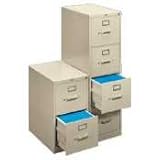
But, also at Office Depot, are the Hon 2-drawer and 4-drawer file cabinets. Hon is a decent brand, and their cabinets meet the above criteria. They are more expensive than the $30 excuses, but are the cheapest file cabinets I’ve found that don’t waste your time.

Get 2-drawer or 4-drawer, depending on your needs. Don’t get the lateral ones that go in sideways. Get the ones that go in normally. Here’s the specific one I recommend, in both 2-drawer and 4-drawer options:

Now, I also recommend having some ordinary drawers at your desk, as I went over in the second post in this series. If your desk doesn’t have those built into it, there are some good drawer units that have two ordinary drawers on top, and then one file drawer below.

If that single file drawer gives you enough room for your files, then you don’t need to get an additional 2-drawer unit. Get the 2-drawer unit (or 4-drawer) if you need additional space.

Bookshelves

IKEA has fantastic bookshelves that look nice at a great price. I love IKEA in general for their motto “we’ll never stop making good design affordable” and for generally living up to it.

They’ve captured it well: keeping things affordable doesn’t mean getting ugly stuff. Good design can be obtained at a good price.

Here are the bookshelves that I use from IKEA:

You can also get the shorter 2-shelf unit, or some nice-looking cubed ones:

Conclusion

This brings us to the end of our series on recommended (physical) productivity tools. I will close the way I began: Having good tools matters.

First, because if you have good tools, you will often find yourself wanting to use them. And “one of the best tricks for enhancing your personal productivity is having tools you want to use.” Second, because bad tools get in the way. And third, because good tools in general make your workspace as a whole a place where you want to be.

Don’t be selectively strategic. Make your workspace work well for you in all respects — give it both an efficient setup and effective tools.

Posts in This Series

  1. Recommended Productivity Tools: An Introduction
  2. The Tools You Need to Have (And Where to Keep Them)
  3. Recommended In Boxes
  4. Recommended Capture Journals
  5. Recommended Pens
  6. Recommended Pencils and Paper Pads
  7. Recommended Staplers, Staple Removers, and Tape
  8. Recommended Scissors, Letter Openers, and Post-Its
  9. Recommended Paper Clips and Super Glue
  10. Not Recommended: Desktop Organizer Things
  11. Recommended Chairs and Waste Baskets
  12. Recommended Labelers and File Folders
  13. Recommended File Cabinets and Bookshelves

Filed Under: Productivity Tools

The Secret of those Who Do So Many Things

September 9, 2009 by Matt Perman

From The Effective Executive:

This is the “secret” of those people who “do so many things” and apparently so many difficult things. They do only one at a time. As a result, they need much less time in the end than the rest of us.

That last sentence is critical: “as a result, they need much less time in the end than the rest of us.”

Filed Under: a Productivity Philosophy, Managing Focus

Recommended Labelers and File Folders

September 9, 2009 by Matt Perman

Post 12 in the series: Recommended Productivity Tools

On Physical Filing

My series on filing is coming up (sorry for the delay). In it I’m going to cover both electronic and physical filing. As a general rule, obviously it makes sense to keep as much as possible electronically and minimize the amount of physical filing that you have to do.

But if you still receive some things made of actual paper that are worth keeping, there is still a need to keep physical files. And so you need to have a decent labeler and some file folders.

Labelers

David Allen has a great paragraph on why having a decent labeler matters. His words here actually illustrate very well the much broader point I’ve made regarding productivity tools in general — namely, that if you have tools that you enjoy using, you will use them more effectively.

Here’s what he says about labelers (on pages 93 and 100 of Getting Things Done):

The labeler is a surprisingly critical tool in our work. Thousands of executives and professionals and homemakers I have worked with now have their own automatic labelers, and my archives are full of their comments, like, “Incredible–I wouldn’t have believed what a difference it  makes!” The labeler will be used to label your file folders, binder spines, and numerous other things.

….

Typeset labels change the nature of your files and your relationship to them. Labeled files feel comfortable on a boardroom table; everyone can identify them; you can easily see what they are from a distance in your briefcase; and when you open your file drawers, you get to see what looks almost like a printed index of your files in alphabetical order. It makes it fun to open the drawer to find or insert things.

Perhaps later in this new millennium the brain scientists will give us some esoteric and complex neurological explanation for why labeled files work so effectively. Until then, trust me. Get a labeler. And get your own. To make the whole system work without a hitch, you’ll need to have it at hand all the time, so you can file something whenever you want. And don’t share! If you have something to file and your labeler’s not there, you’ll just stack the material instead of filing it.

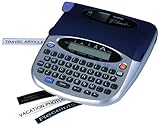
I recommend the Brother PT-1750. The reason is: It’s easy to figure out and it works well. Here it is:

There’s just one problem: it appears to have been replaced by a more up to date model, so you can only get it used. The problem with the more up to date model is that it is harder to use. They added some features, and failed to integrate them in a usable way into the interface.

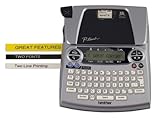
I think its replacement is the Brother PT-1880:

I have this newer version at work because I had to replace my labeler there, and the better earlier model had been discontinued by then.

Label Tape

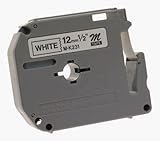
Along with the labeler, you also need label tape. Get the half inch, black on white tape:

When it comes to label tape or any other supply, remember this principle: Get two. Keep one in use, and the second in with your extra supplies. When the one you are using runs out, grab the one in with the extras and replace it.

In other words: Always keep one extra, and replace it as soon as you use it. That way, you never run out — you’re always one ahead. This same principle works with everything — rock salt (if you have a water softener), furnace filters, everything.

File Folders

Get the third-cut file folders. Third-cut means the tab at the top will be in one of three slots. There is also five-cut, which I don’t recommend because it makes the tabs so small.

The file folders at Office Depot work just fine. Here is an example.

You can get plain ones or colored ones. If you get colored ones, just make sure to have a rhyme and reason to things and keep it simple. I’ll talk more about that in my posts on filing.

Posts in This Series

  1. Recommended Productivity Tools: An Introduction
  2. The Tools You Need to Have (And Where to Keep Them)
  3. Recommended In Boxes
  4. Recommended Capture Journals
  5. Recommended Pens
  6. Recommended Pencils and Paper Pads
  7. Recommended Staplers, Staple Removers, and Tape
  8. Recommended Scissors, Letter Openers, and Post-Its
  9. Recommended Paper Clips and Super Glue
  10. Not Recommended: Desktop Organizer Things
  11. Recommended Chairs and Waste Baskets
  12. Recommended Labelers and File Folders
  13. Recommended File Cabinets and Bookshelves

Filed Under: Productivity Tools

Doing One Thing at a Time is the Way to Get More Done, Not Less

September 8, 2009 by Matt Perman

From Drucker’s The Effective Executive:

Concentration is necessary precisely because the executive faces so many tasks clamoring to be done. For doing one thing at a time means doing it fast. The more one can concentrate time, effort, and resources, the greater the number and diversity of tasks one can actually perform.

Filed Under: f Execute

  • « Previous Page
  • 1
  • …
  • 122
  • 123
  • 124
  • 125
  • 126
  • …
  • 155
  • Next Page »

About

What’s Best Next exists to help you achieve greater impact with your time and energy — and in a gospel-centered way.

We help you do work that changes the world. We believe this is possible when you reflect the gospel in your work. So here you’ll find resources and training to help you lead, create, and get things done. To do work that matters, and do it better — for the glory of God and flourishing of society.

We call it gospel-driven productivity, and it’s the path to finding the deepest possible meaning in your work and the path to greatest effectiveness.

Learn More

About Matt Perman

Matt Perman started What’s Best Next in 2008 as a blog on God-centered productivity. It has now become an organization dedicated to helping you do work that matters.

Matt is the author of What’s Best Next: How the Gospel Transforms the Way You Get Things Done and a frequent speaker on leadership and productivity from a gospel-driven perspective. He has led the website teams at Desiring God and Made to Flourish, and is now director of career development at The King’s College NYC. He lives in Manhattan.

Learn more about Matt

Newsletter

Subscribe for exclusive updates, productivity tips, and free resources right in your inbox.

The Book


Get What’s Best Next
Browse the Free Toolkit
See the Reviews and Interviews

The Video Study and Online Course


Get the video study as a DVD from Amazon or take the online course through Zondervan.

The Study Guide


Get the Study Guide.

Other Books

Webinars

Follow

Follow What's Best next on Twitter or Facebook
Follow Matt on Twitter or Facebook

Foundational Posts

3 Questions on Productivity
How to Get Your Email Inbox to Zero Every Day
Productivity is Really About Good Works
Management in Light of the Supremacy of God
The Resolutions of Jonathan Edwards in Categories
Business: A Sequel to the Parable of the Good Samaritan
How Do You Love Your Neighbor at Work?

Recent Posts

  • How to Learn Anything…Fast
  • Job Searching During the Coronavirus Economy
  • Ministry Roundtable Discussion on the Pandemic with Challies, Heerema, Cosper, Thacker, and Schumacher
  • Is Calling Some Jobs Essential a Helpful Way of Speaking?
  • An Interview on Coronavirus and Productivity

Sponsors

Useful Group

Posts by Date

Posts by Topic

Search Whatsbestnext.com

Copyright © 2026 - What's Best Next. All Rights Reserved. Contact Us.